

AI Agents in 2026: What Can AI Agents Actually Do?
Discover what AI agents can actually do in 2026, from automating tasks and making decisions to handling workflows, improving productivity, and working with other AI tools.

Tanvi Ladva
Author & Contributor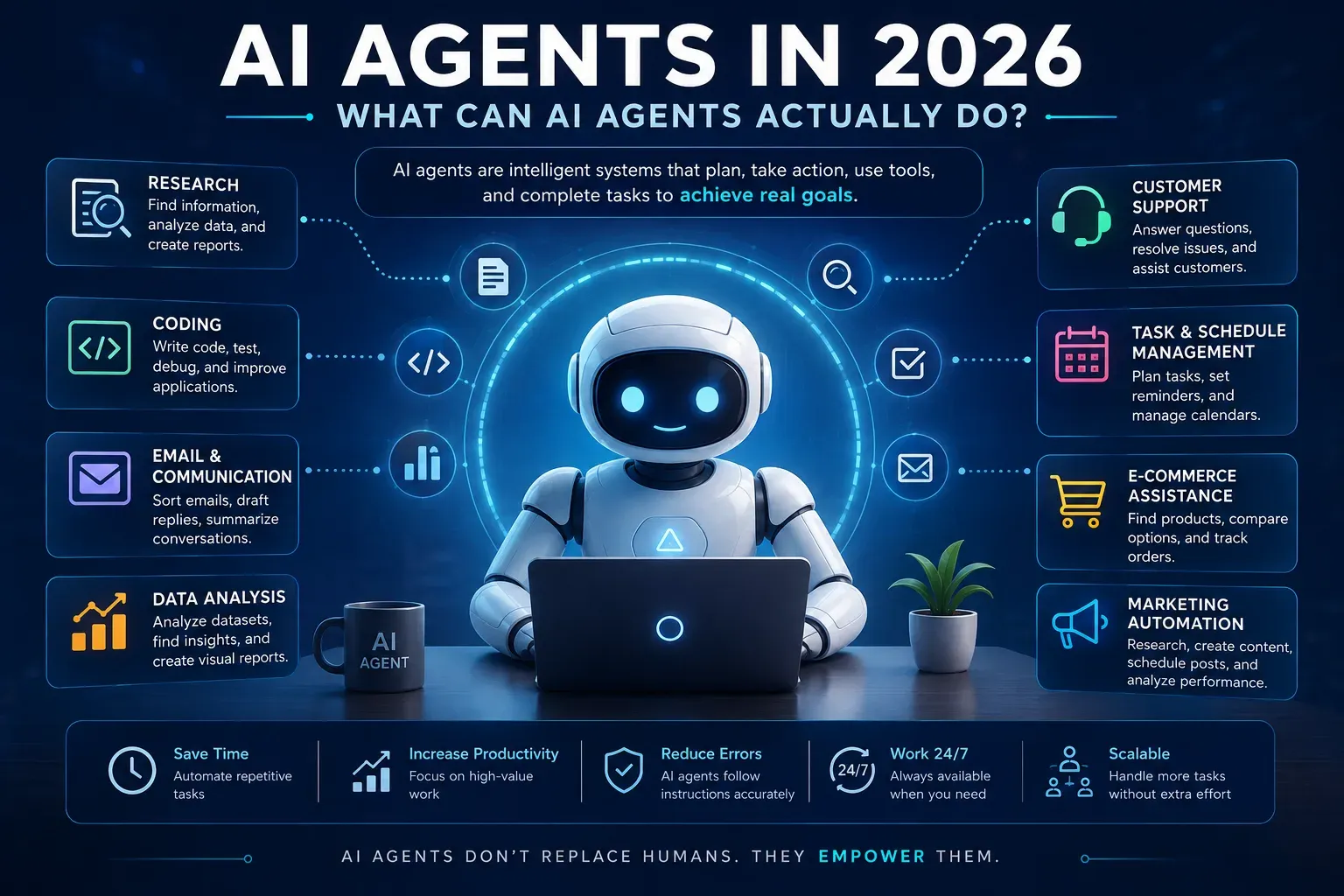
AI Agents in 2026: What Can AI Agents Actually Do?
Artificial intelligence has moved far beyond simple chatbots.
A few years ago, most people used AI to generate text, answer questions, summarize documents, or write code. In 2026, a new category of AI is becoming increasingly important: AI agents.
Unlike traditional AI tools that mainly respond to individual prompts, AI agents can be designed to plan tasks, use tools, make decisions, interact with software, and complete multi-step workflows with much less human intervention.
But what can AI agents actually do in 2026? And are they really capable of replacing the way we work?
Let's explore it in simple terms.
What Is an AI Agent?
An AI agent is a software system powered by artificial intelligence that can work toward a specific goal by taking multiple actions rather than simply producing one response.
For example, imagine telling an AI:
"Find five potential suppliers for this product, compare their prices, create a spreadsheet, and prepare an email asking for quotations."
A basic chatbot might explain how you could do those tasks.
An AI agent could potentially perform several of them itself by:
Understanding the objective
Breaking the task into smaller steps
Searching for information
Using connected tools
Organizing the collected information
Creating a document or spreadsheet
Preparing the final output
The important difference is action.
A chatbot primarily answers.
An AI agent can be designed to act.
How Do AI Agents Work?
Most AI agents combine several technologies rather than relying only on a large language model.
A simplified AI-agent workflow looks like this:
Goal → Planning → Tool Use → Action → Check Results → Next Action → Completion
For example, suppose an AI agent is asked to research a competitor.
It could:
Search websites
Read available information
Extract relevant data
Compare companies
Identify important differences
Create a report
Ask for clarification if required
The exact capabilities depend on the tools and permissions connected to the agent.
AI Model
The AI model provides the reasoning and language capabilities.
Tools
Agents can be connected to tools such as:
Web search
Databases
APIs
Spreadsheets
Email
Calendar systems
Coding environments
Business software
Memory or Context
Some agents can maintain information about previous interactions or the current task so they don't have to start from zero at every step.
Rules and Permissions
Agents also need boundaries.
For example, an organization might allow an agent to draft emails but require a human to approve them before sending.
This is particularly important when an AI system can make changes to real-world data or services.
What Can AI Agents Actually Do in 2026?
The biggest advantage of AI agents is their ability to handle multi-step workflows.
Here are some practical examples.
1. Research and Information Gathering
AI agents can help automate research tasks.
Instead of manually opening dozens of websites, collecting information, and organizing it, an agent can potentially perform several of these steps automatically.
For example:
Task: Research the electric vehicle market.
An agent could:
Find relevant companies
Collect publicly available information
Compare specifications
Organize findings
Summarize important developments
Create a structured report
Human review is still important, especially when accuracy and source quality matter.
2. Coding and Software Development
AI agents are increasingly being used for software development workflows.
Instead of asking AI to write one function, developers can give an agent a larger task such as:
"Add authentication to this application and update the relevant tests."
Depending on the environment and permissions, an agent may be able to:
Inspect a codebase
Identify relevant files
Write or modify code
Run tests
Find errors
Make corrections
Explain the changes
This doesn't mean developers are no longer necessary.
Software projects still require architecture decisions, security reviews, testing, debugging, and human judgment.
However, agents can reduce the amount of repetitive development work.
3. Customer Support
Customer service is another area where AI agents can be useful.
A traditional chatbot might answer:
"What is your refund policy?"
An AI agent could potentially go further.
For example:
Identify the customer's account
Check the order
Review the refund rules
Determine whether the request qualifies
Create a refund request
Update the customer
Companies can also keep human agents involved for unusual or sensitive cases.
This creates a hybrid model where AI handles routine workflows and humans handle exceptions.
4. Email and Communication
AI agents can help manage repetitive communication.
For example, an agent could potentially:
Sort incoming messages
Identify urgent emails
Summarize long conversations
Draft replies
Extract tasks
Create follow-up reminders
Organize information
Instead of spending hours processing routine messages, people could focus on decisions that require human attention.
5. Personal Productivity
AI agents can also act as digital assistants.
Imagine telling an AI:
"Help me organize my work for this week."
Depending on the connected tools, an agent could analyze your tasks, identify deadlines, organize priorities, and prepare a schedule.
More advanced systems could potentially interact with calendars, project-management software, documents, and other productivity tools.
The important limitation is that these capabilities depend on what the agent is actually connected to and what permissions it has.
6. Data Analysis
AI agents can help businesses work with large amounts of information.
For example, a company could provide sales data and ask an agent to:
Analyze monthly performance
Identify unusual changes
Compare product categories
Create charts
Summarize important findings
Prepare questions for further investigation
Instead of manually performing every step, an agent can assist with the workflow.
However, important business decisions should not be based blindly on AI-generated analysis. Data quality and interpretation still require human oversight.
7. Marketing
Marketing teams can use AI agents for repetitive tasks across the content workflow.
An agent might help with:
Keyword research
Content research
Social media drafts
Competitor analysis
Content calendars
Email campaigns
Performance summaries
For example, a content workflow could look like:
Keyword → Research → Article Draft → SEO Review → Social Posts → Performance Analysis
An AI agent could potentially coordinate multiple steps of this process.
8. E-Commerce
AI agents could also change how online shopping works.
Instead of searching for products manually, a customer could give an agent a goal such as:
"Find a laptop suitable for programming under my budget."
The agent could potentially compare products, specifications, availability, and other criteria before presenting options.
More advanced shopping agents could eventually handle additional parts of the purchasing workflow where the platform permits it.
This could make online shopping more conversational and goal-oriented.
AI Agents vs Traditional Chatbots
The difference becomes easier to understand with an example.
Traditional chatbot
User:
"How can I reset my password?"
AI:
Provides instructions.
AI agent
User:
"I can't access my account. Help me reset my password."
An agent with appropriate account-management tools might:
Verify the available account information
Check the account status
Start the reset process
Send or trigger the required verification
Confirm completion
The key difference isn't simply that one is "smarter."
The difference is that an agent can have tools, permissions, planning capabilities, and the ability to perform actions.
AI Agents Are Not Completely Autonomous
The word "autonomous" can sometimes make AI agents sound more capable than they really are.
In reality, an AI agent's capabilities depend heavily on its environment.
An agent without access to external tools may only be able to generate text.
An agent connected to APIs, databases, browsers, files, and business systems can potentially perform much more complex tasks.
That's why it is better to think of an AI agent as:
AI + Tools + Instructions + Context + Permissions + Actions
rather than simply "an AI that can do everything."
What Are the Benefits of AI Agents?
AI agents could provide several important benefits.
Faster workflows
Agents can automate repetitive multi-step processes.
24/7 operation
Software doesn't need traditional working hours.
Less repetitive work
Employees can spend less time on routine administrative tasks.
Better scalability
A company can potentially automate workflows without increasing manual effort at the same rate.
Personalized assistance
Agents can potentially adapt workflows to individual users and situations.
Integration with existing software
Agents become more useful when they can interact with the tools people already use.
What Are the Risks of AI Agents?
AI agents also introduce new risks.
Because agents can take actions rather than simply provide information, mistakes can have real consequences.
Incorrect decisions
An AI agent can misunderstand instructions or produce incorrect information.
Security problems
If an agent has access to sensitive systems, poor security controls could create serious risks.
Excessive permissions
Giving an agent unnecessary access can increase the potential damage from an error or security issue.
Privacy concerns
Agents may process emails, documents, customer information, or other sensitive data.
Lack of human oversight
Some decisions should still require human approval.
For important workflows, organizations should consider permissions, logging, testing, monitoring, and approval mechanisms.
Will AI Agents Replace Jobs?
This is one of the biggest questions surrounding AI agents.
The more realistic question may be:
Which tasks will AI agents automate?
Many jobs consist of dozens or hundreds of individual tasks.
AI agents may automate some of those tasks without completely replacing the entire role.
For example, a marketing professional might continue making strategic decisions while an AI agent handles repetitive research and reporting.
A developer might continue designing the architecture while AI agents help write code and run tests.
A customer-support employee might handle complex customer problems while AI handles routine requests.
This means the impact of AI agents may involve changing how people work, rather than simply removing every job associated with an automated task.
How Businesses Can Start Using AI Agents
Businesses don't necessarily need to automate everything at once.
A practical approach is to start with a repetitive workflow.
For example:
Step 1: Identify a repetitive task.
Step 2: Document the current workflow.
Step 3: Determine which steps can safely be automated.
Step 4: Give the AI only the permissions it needs.
Step 5: Add human approval where necessary.
Step 6: Test the workflow with low-risk tasks.
Step 7: Monitor results and improve the system.
This approach can reduce the risks associated with giving an AI system too much freedom too quickly.
What Does the Future of AI Agents Look Like?
AI agents are moving AI from a question-and-answer model toward a more action-oriented model.
Instead of asking:
"What should I do?"
People may increasingly ask:
"Can you handle this task for me?"
That change could have a major impact on software.
Applications may become less about clicking through dozens of menus and more about describing an objective.
For example:
"Prepare this month's sales report."
"Find the best time for this meeting."
"Analyze these customer complaints."
"Create a first draft of the marketing campaign."
The software behind the scenes could determine which steps need to be completed.
However, the future of AI agents will depend on more than just model intelligence. Security, reliability, privacy, transparency, and human control will be equally important.
Final Thoughts
AI agents are one of the most interesting developments in artificial intelligence in 2026.
They are different from traditional chatbots because they can potentially plan, use tools, interact with software, and complete multi-step tasks.
From software development and research to customer support, marketing, data analysis, and personal productivity, AI agents are creating new possibilities for automation.
But AI agents are not magic.
Their capabilities depend on the models, tools, data, permissions, and safeguards behind them. Human oversight remains important, especially when an agent can make decisions or take actions that have real consequences.
The biggest change may not be that AI does everything for us.
Instead, it may be that we increasingly move from using software step by step to giving software a goal and letting AI handle parts of the workflow.
And that could fundamentally change how we work with computers.
Frequently Asked Questions
What is an AI agent?
An AI agent is an AI-powered software system designed to pursue a goal by planning tasks, using tools, and taking actions across multiple steps.
What can AI agents do in 2026?
AI agents can assist with research, coding, customer support, data analysis, marketing, productivity, communication, and other multi-step workflows, depending on their tools and permissions.
Are AI agents the same as chatbots?
No. A chatbot primarily responds to user prompts, while an AI agent can be designed to plan and execute multiple actions using connected tools.
Can AI agents replace humans?
AI agents can automate certain tasks, but their ability to replace an entire job depends on the job and the specific workflow. Human judgment, oversight, and accountability remain important for many tasks.
Are AI agents safe?
AI agents can introduce risks involving incorrect actions, privacy, security, and excessive permissions. Proper access controls, monitoring, testing, and human approval can help reduce these risks.
Why are AI agents becoming popular?
AI agents can potentially automate multi-step workflows instead of only generating individual responses. This makes them useful for tasks that previously required people to work across multiple applications and processes.
